
AI Coding Assistants and Agents are changing the way software is created, but developers have been expected to learn how to use them without any guidance. As managers push developers into adopting these tools how are they expected to avoid the dangers and pitfalls of vibe coding? In this post I take a high level look at the tools and practices developers can use to move quickly with AI without wanting to set their code bases on fire.
This post was written entirely by me, without the use of AI writing tools. I plan on keeping this guide up to date with regular updates in an attempt to keep it current as these tools evolve.
Table of Contents
The Basics of AI Coding Assistants
Just like learning your ABCs, you have to understand the basics of a coding assistant to actually know how to use it well. If you've been using a coding assistant already you can skip ahead, but if you are completely new to the idea then this section will give you enough of a foundation to get started and understand the later sections.
Agents, IDEs, and Providers
When I first wrote this article there wasn't really a distinction between Agents, the IDEs they were attached to, and the Providers of models. If you wanted to use GitHub Copilot you did so using the Agent they put into the VSCode IDE, and if you wanted to use Anthropic as the provider you downloaded their system.
This is no longer the case: the IDE and Agents have split, and many are now agnostic to the provider. As a result we have to think a bit about what these components are and what we want to use. This is worthy of its own blog post, but I'm going to try and keep it simple for now.
Providers are where you get your model access from. In general the way to pick a provider is to look at what models they have available and what the costs are. Your provider can be a big company like Microsoft (via GitHub), a frontier AI company like Anthropic, or a reseller of multiple model families like OpenCode Go or OpenRouter. If you have the hardware you can also be your own provider by running Open Weight models on your own.
Agents are the actual harness or coding assistant that you're utilizing. Most of the providers have their own harness you can use (GitHub has the Copilot harness, Anthropic has Claude Code) and there are a lot of open source options such as OpenCode that can work with any provider.
The IDE is where you typically code. Until recently you had to change your IDE when you changed Providers or Agents, but now you have the flexibility to keep using what you prefer or explore new options.
Picking a Provider
At the end of the day there are two factors to consider with providers: do they have the models you want to use, and do they have them at the prices you want to pay. We are rapidly reaching a place where the models themselves are essentially commodities offered by multiple companies, not special bespoke items, and the value that you can get from one provider to another isn't that different as long as they provide the models you want.
If you're just dipping your toes into the water I recommend spending $10 at OpenCode Go, or just taking advantage of the free models they have available. This is my personal option as a way to get started quickly: there's no affiliate code or sponsorship, and once you decide whether this is an area you plan on spending time in I recommend you research the options yourself. Personally I went and bought a GPU machine (back before prices exploded) and host models directly.
Picking an Agent
The first agents most people use are the ones provided by the vendors they get their models from: GitHub Copilot, Claude Code, Devin. These are the easy, off the shelf, agents and are often a really great start. The big downside with these systems is that they are mostly locked into the vendor who provides them. If you want to use Claude Code with GitHub Copilot models you're going to struggle.
My personal choice of Agent is OpenCode (I have even open sourced my config for it), which is an open source agent with a lot of community support. The reason I like it is that it grows with you from a new user who isn't sure what to do all the way up to power user levels. The other reason I really like it is that it can work with pretty much every provider out there, with no lock in: you can use OpenCode Go (of course), but you can also use OpenAI or Anthropic or bring your own GPUs.
The other major open source agent is the Pi coding agent. This is an extremely minimal but highly customizable framework that essentially allows you to build your own agentic. Just like OpenCode, it has the flexibility to work with a variety of providers so you can move around depending on pricing and models. While a ton of developers end up here, it is a bit more of a power user tool that new users may find overwhelming.
Picking an IDE
One of the major benefits of the decoupling between the Agent and the IDE is that you can pick just about any IDE you want, including the one you are already using. For someone just getting started with agentic coding this can reduce the learning curve considerably.
The major change that enabled this was the introduction of the Agent Client Protocol (ACP). This defined a standard way that IDEs can communicate with Agents and was very quickly adopted on both sides. Now that platforms like the Jetbrains Suite, Xcode, Android Studio, and others natively support ACP you can bring almost any agent to your IDE without concern. Although Microsoft seems to be ignoring the ACP protocol for VSCode, a variety of extensions exist to fill that gap.
As your get further into the agentic coding world you might find that traditional IDEs aren't meeting your needs though, and when this happens you can bring your agent to a new IDE without having to reconfigure your agent itself. This can make exploring newer IDEs like OpenChamber and Zed a lot easier.
The Chat Interface
Regardless of which combination you choose the interface is pretty much always the same. When working with coding assistants, or any LLM (Large Language Model) based system, you'll be working in regular human language to communicate with the assistant. When you want the agent to do something you send it a message (also called a Prompt, as in you prompt the agent to take action) and then it will respond with a combination of actions and text.
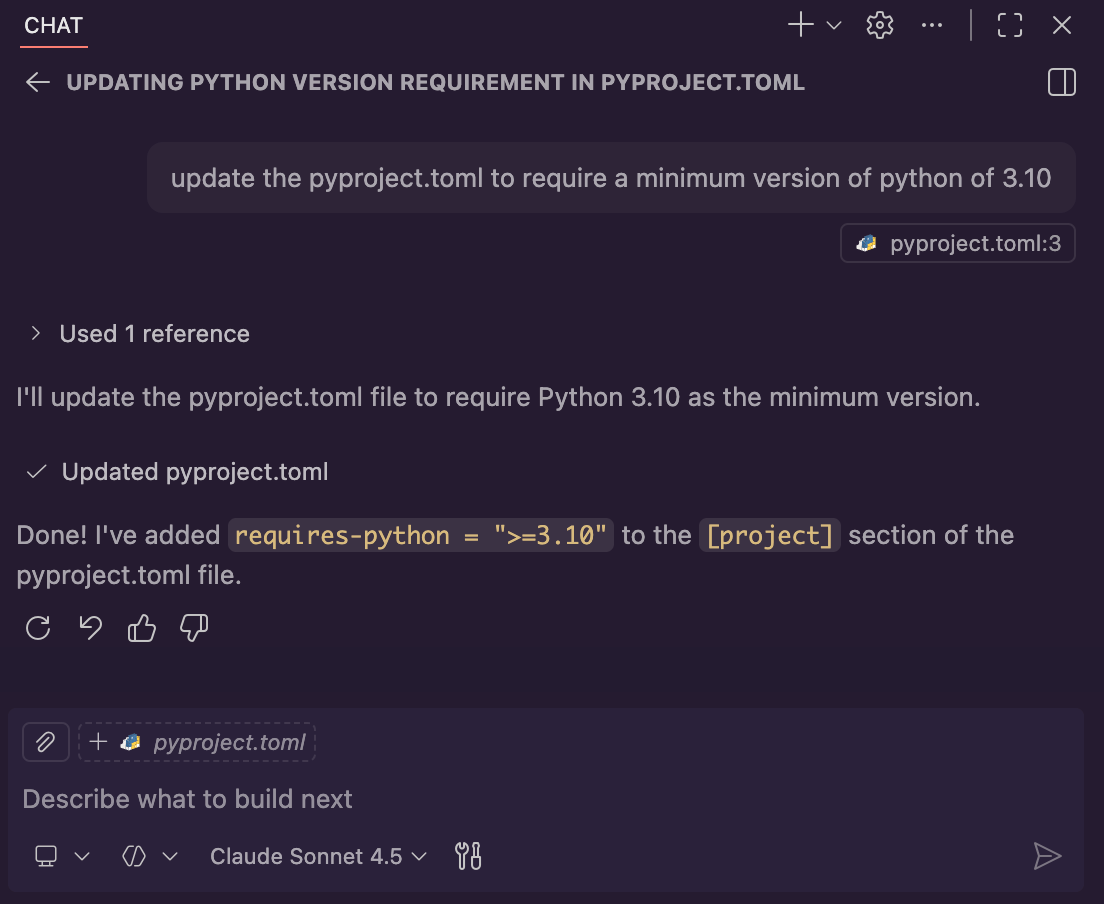
You have a few options built right into the chat interface: different modes (you'll primarily use Agent), your selected model, and your available tools. You can also use the paperclip to highlight files that you want your coding assistant to explicitly take into account while coding.
As you can see this is all really basic (especially for such a trivial request). In a future post I may go over the more advanced features of these tools, but this is really all you need to get started.
Picking a Model
When working with your coding assistant you get to pick what model your agent uses to make decisions. Unlike the IDE discussion, I do have strong opinions here. In my experience the Claude models absolutely destroy the other models in all forms of coding, including planning, testing, and documenting systems.
Unfortunately picking a model comes with a cost (literally). Most coding assistants charge extra for "premium" models. With GitHub Copilot Pro you get 300 premium requests per month, and your model selection will affect how quickly you go through that. The free models tend to perform very poorly compared to the premium ones, to the point that I recommend you don't even bother using them.

For my personal use I rely a lot on the open weight model, Qwen 3.6 27b. Not everyone has their own GPUs though, and in the professional space I have to work with whatever providers my employer picks. As a result I also use Claude Sonnet 5 quite a bit, and occasionally use Claude Opus as well. I tend to avoid the GPT models as I find them less consistent.
This entire paragraph could be outdated by the time you read it though, so I really do suggest experimenting with the latest options when you get started. The ecosystem is evolving rapidly and new models, open weight and otherwise, are coming out fast, so be prepared to do some experimentation.
Prompting the System
Now that you've picked an IDE, have selected a model, and have figured out where the chat interface is it is time to figure out how to actually use it. At first this seems pretty intuitive, as you are just using regular language to tell your coding assistant what you want. Communication is not a trivial skill though, and shifting from the logic based world of programming to the world of communication can be tough for some people. When prompting remember the following:
- Utilize proper grammar and formal language. While LLMs can interpret a variety of language the most casual you get the more room for "personality" to start leaking into the coding assistant.
- Put as many details as you can into your request. If you have an idea of how something should work don't force the coding assistant to guess at it, simply state it. You can simply list requirements and get very far.
- Pay attention to what works and what doesn't, so you can build your communication skills over time.
Another thing to remember is that all coding assistants have the ability to store reusable prompts in your repositories. If you find that you are typing the same things over and over again consider spending time refining your request into a reusable prompt (this will be the subject of a future post).
The Dangers of Vibe Coding
If you've been in any development community over the last couple of years you've probably seen examples of projects going completely off the rails after developers started using AI to expand the code base. I've seen examples including entire projects being completely erased (with no usage of source code management like git), insecure practices leading to data leaks, and projects that become completely unmanageable after a few months of development. When developers lean too heavily into relying on the AI Assistant there is a real danger of quality plummeting.
What is Vibe Coding
When using an AI Assistant without any real process or training there is an instinct to approach it as if it were a support bot. Developers will come to the AI with a problem, often described in a couple of sentences, and then will run with whatever the Agent suggests. If it works they move on, and it it doesn't they complain to the Agent. This process iterates until the new feature is functional, at which point the developer commits the code and moves on with another feature. The developer may or may not have even looked at the code that was produced.
This process is Vibe Coding at its core.
From the developer's perspective they are making progress (after all, the feature they were asked to implement does work). Managers seem to love it, and non-technical people are always impressed at how much they can accomplish on their own (the rise of startups without developers is a horrifying example of this). With the initial adoption of AI there is a huge boost in productivity and items that have been sitting in the backlog get pushed out faster than anyone could have expected.
Skip ahead six months and it is a very different story. Features are taking longer to complete and rarely get finished without introducing new regressions into the system. Developer morale is down as they seem to be spending more time dealing with fires than actually building things, and when they do build things it is on top of a system that is hard for them to understand. Rather than working with a coherent code base they find different styles, libraries, and methodologies mixed throughout the system.
Where did things go wrong?
Task Orientated at the expense of the Big Picture
The biggest problem with Vibe Coding is that the Agentic system is not going to consider the big picture of your project. When you ask it to do a task it will do that task, often quite literally and with no regard to how the rest of the system is designed. The AI doesn't know what you know (it technically doesn't know anything at all, which we'll get to), and it will do anything to meet the command.
Most of the obvious signs of Vibe Coding from this problem:
- Introducing multiple third party libraries for the same task
- Implementing code that should have been a third party library
- Switching between different coding styles (ie, camel case to snake case)
- Placing new files in seemingly random locations
- Breaking existing functionality when making changes
- Inconsistently testing code (or not testing at all)
- "Fixing" broken tests by changing the tests instead of fixing the bugs
- Contradictory or downright false documentation
- Using deprecated functions or libraries
Without guidance the AI doesn't know what is or isn't important, so it puts a very heavy weight on the request that you make of it.
The Memory of a Goldfish
Despite what people may believe, AI is not actually all that intelligent. Unlike a human, who can learn from on the job training or through experience working with a code base, the type of AI that our coding assistants are built on only learn during special model training periods that occur before a model is released. Although your assistant may get better over time, that's the result of engineering effort and the development of new models rather than an inherent learning process by the model.
What this means is that no matter how many times you scream at your AI that it has to always read the documents, or that it must use asynchronous instead of synchronous libraries, it is not just going to remember this without some additional work on your end. Every single session with an AI is a brand new conversation with little to no knowledge of the past.
What's worse is that AI may not even remember all of the conversation you're currently having. Anyone who has used Github Copilot long enough as seen the "Summarizing Conversation" notice come up. This happens because it is very expensive and time consuming to send the entire conversation history to the model, and all models have a limit on how much they can take at once. To work around this limitation these systems often shrink down the conversation into summaries, with various degrees of success. The longer a conversation goes on the more it will drift from the original purpose and lose data.
Context Windows and Agent Drift
If you aren't familiar with modern AI (and LLMs specifically) it might help to understand exactly how a conversation happens with an AI. The model itself is typically the least interesting part of the system: it is a stateless system that takes a bunch of text as the input, and outputs a bunch of text as the output. Every time it runs it needs to be given all of the text it needs to make the output it wants.
This has a lot of ramifications. Every time a new request is sent to a model it has to have everything it needs, including all of the past conversations, in order to make the next decision. As your conversation with an agent goes on you are constantly sending the exact same data (previous messages, reviews from code, etc) back to the model over and over again.
Models have limits though. Each model can only have so much text that it can input before it hits that limit. This is called the Context Window. As your conversation with the coding assistant continues that context window gets used more and more. Even before it runs out this can cause a degradation in the quality of responses.
Once the limit is hit something has to be done or the session would end. This is when you'll see messages such as "summarizing conversation": this is Copilot attempting to condense the previous conversation to free up more space in the context window for additional conversation.
The problem is that summarizing the conversation by definition means parts of the conversation go away. A single session may hit this point repeatedly, and over time more and more of the original conversation may go away. More recent messages, which haven't been summarized, will take priority over text further back in the conversation. Without something to keep the coding assistant on track this can result in it getting further and further off task.
Personality of Waylon Smithers
There are a lot of people out there who compare these tools to junior engineers, but I think that is a mistake. When I say something that doesn't make sense to a junior engineer they'll ask questions to try and understand. Models, on the other hand, just assume I'm an all knowing god and rush ahead to double down on my stupid decisions.
This is all due to my least favorite part of AI tools: their sycophantic personalities. These systems are designed to do what people tell them, but this comes at a cost: people are often wrong. Just because I say "you should do this thing" doesn't mean that I am right. Coding assistants don't understand that and will take whatever you say as truth, which is one of the easiest ways to turn a code base into a pile of slop.
Lack of Training
While all of the other problems are mostly technical, there is one massive reason why people Vibe Code: no one has taught them a better method!
It is unreasonable to expect people to suddenly understand how to use these new and powerful tools without there being some level of education around doing so. Unfortunately though these tools are so new that there isn't a well defined industry standard method to utilizing these them, let alone an approach to training people with that method. For most developers their first encounter with AI coding assistants is either experimentation on their own time or pressure from their managers to adopt the new technology without much guidance.
Setting a Foundation
If we want to avoid the pitfalls of Vibe Coding we need to first start by setting some structure and cleaning up our code base. Although this might seem like a tangent, this may be one of the most important parts of adopting any AI coding assistant. You need a proper foundation, a healthy code base, and deterministic systems to keep it that way.
Greenfield versus Brownfield
Contrary to what seems to be a very common opinion, it is actually much easier to use coding assistants with existing projects than it is with new ones. This might seem counterintuitive, as the general rule is that adopting new technologies and processes is easier to do when creating new projects. Existing projects, especially mature ones, give agents boundaries and examples to work within. If you've already got a defined project structure then it is less likely the agent will put things in random places.
New projects, especially those started from an empty repository, lack that foundation. This makes it much easier to end up in a vibe coding state as the AI does whatever it can to accomplish the task without taking that bigger picture into account (as it doesn't really have any way to even guess at what that bigger picture is).
My personal cheat code for this is to never start from an empty repository. I have an open source Python template I created and use for all my projects, but if you aren't using Python there are templates out there for most languages. The scaffolding you get from these templates is a huge boost for your coding assistant.
Tests, Tests, and More Tests
If you do not test your code you will not know when your code breaks. This is a very big problem when you have coding assistants writing that code for you: without automated tests you either have to test it all manually or rely on the AI to never make mistakes (spoiler: AI will make mistakes). This is unsustainable, but is unfortunately a cornerstone of a lot of vibe coded projects.
Before you begin adding new features with coding assistants make sure you have a robust test suite in place. This is about more than high code coverage: although a lack of code coverage is a sign of a weak test suite, a high code coverage is not a sign of a strong test suite. You want to make sure you cover a variety of use cases so you can be confident that there are no regressions during development.
This isn't just about preventing bugs (although that is important). A strong test suite is additional context that can be used by your coding assistant to better understand your code base. When you have more test cases in code you have more test cases that the AI can read.
Generating these tests is also something that AI is actually fairly good at. If your test suite is weak you can use AI to help flesh it out. You should be careful here though and make sure you provide a lot of oversight while doing so, or your test suite will lack structure and coherency. You also need to be very careful that the tests being written actually match the behavior you expect and want to test for.
Documentation
A huge part of programming with an AI coding assistant is giving your assistant access to the right data. This isn't unique to coding: all AI based systems do better if you can provide them with the appropriate context to make their decisions. A code base that is well documented makes this easier for coding agents to find what they need to accomplish their tasks.
Without documentation that same agent will have to crawl through the code base to build an understanding. This takes time, can be prone to error, and has to be redone for every session. With proper documentation the agent can make a lot of decisions much quicker.
Just like with tests it is possible to use your coding assistant to help you write documentation. However, without enough context these documents are going to be prone to hallucination. It is absolutely vital that you review and confirm any generated documents, as any misinformation that goes in now will be fed into your coding assistant in future sessions when it reads those documents.
For that matter it is also important that you review human generated documentation. Bad documentation will throw off any AI system regardless of how it was written. As the saying goes, Garbage In Garbage Out.
Static Code Analysis
Both AI and standard style deterministic computing have their strengths and weaknesses, but when paired together they both can perform much better than they do on their own. When you incorporate static code analysis tools like linters, type checkers, and formatters into your code base you give your coding agent tools that give it more structure to work with.
This can be really powerful. Just like your coding agent can run tests to check for regressions and then correct them on its own, these same agents can fix their own linting bugs and type errors if they have a way to check for them.

Although the specifics are language specific, you should make sure to include static code analysis for these tasks:
- Formatting: Having your coding assistant validate and fix formatting issues on its own saves time and means you have less to document yourself.
- Linting: Most languages have some linting tools, which are really just collections of static code quality rules. These are great for giving the AI guardrails and constraints.
- Typing: This may be baked into your language, or it may be optional. I really recommend adopting typing, and the checks for it, as a way to prevent some of the common mistakes coding assistant might make and to give those assistants a way to clean up when they make mistakes.
- Security: Although more rare to see, I think having a security scanner of some sort can be very helpful.
The exact static tools you end up using are going to depend on the language of the project. That said here are some basic examples to gives you some ideas.
| Python | TypeScript | Go | OpenTofu/Terraform | |
| Formatting | ruff | Prettier | gofmt | Built In |
| Linting | ruff | ESLint | golangci-lint | tflint |
| Typing | mypy or ty | Built In | Built In | Built In |
| Security | bandit | npm audit | gosec | Checkov or Trivy |
| Testing | pytest | Jest | Built In | Terratest |
What's really nice is that most terminal applications have integrated documentation (typically with a --help flag) that coding assistants can use to learn about the command and adjust how they use it.
Continuous Integration and Pull Request Reviews
Having these tools available is one thing, but actually ensuring that they are actually used is another. These tools are also not infallible, and while they are absolutely amazing and helpful to have you don't want to rely on them to the point where you don't bother with code reviews.
At a minimum though, if you are really trying to keep your project from spiraling downward in quality, you really do want to set things up so your tests are run as part of every pull request. You also want to make sure your team has a procedure for pull request reviews (and actually follows it).
Wait, aren't these just general best practices?
Although these are best practices, if we're being honest they aren't universally adhered to. We have all seen code with outdated documentation and little to no testing. There are even repositories out there that don't have a standard formatting rule they follow. This is a bad experience for developers, especially junior developers or new ones joining a project, but industry pressures means it hasn't really changed.
If you want to have a reasonable time using a coding assistant you have to follow these best practices. They stop being recommendations and become requirements. Every time you open a new chat session you are basically inviting the most junior of engineers to review your project for the first time: they may have knowledge, but they lack all context of the code base itself.
Without the guardrails that come with tests, the deterministic quality controls of static analysis, the structure of an existing code base, and the documentation to pull it all together your coding assistant will make a mess of things: and it will potentially do so quickly. While the entire selling point of AI is that it can move faster, this really is a double edged sword. When the AI screws up (and it will) it can make a monumental mess of things. The sooner you can catch this the less backtracking and cleanup (or just straight up throwing away work) you'll have to do.
This isn't just something I'm guessing about. A recent study, Code for Machines, Not Just Humans: Quantifying AI-Friendliness with Code Health Metrics, came to this conclusion (emphasis mine):
Alongside organizational and process factors, code quality should inform deployment decisions for AI-assisted development. Healthy code highlights safer starting points in the codebases whereas Unhealthy code calls for tighter guardrails and more human oversight. In practice, code quality will likely be a prerequisite to realize the promised benefits of the AI acceleration.
If you dig into the study further you'll find that bringing AI into a code base that isn't healthy will increase the rate of defects, but if you bring it into a code base that is healthy then your coding assistants will maintain that health and have better outcomes. To put this another way, if you bring a coding assistant to a garbage code base then that coding assistant will make it even worse. You have to have the standard best practices for a solid code base or you can not take advantage of everything AI coding assistants can offer.
Tuning with AGENTS.md
Now that we've hit the foundational stuff it is time to get into the AI specific functionality, and the first place to begin is by tuning the coding assistant to your project, standards, and preferences. This isn't a matter of configuring a YAML file: when you talk about configuring an agentic system you get into the realm of Prompt Engineering. This is just a fancy way to say that you use natural language to tell your agent how to behave.
The AGENTS.md Standard
In the ancient times (early 2025) we were stuck copy/pasting the same set of instructions into a different place to support each coding assistant that might be used. If your project had developers using Claude, Windsurf, and Copilot then you had three copies of that document copied out for all of them. Fortunately the companies behind these projects had a moment of clarity and realized this was super annoying, and the AGENTS.md standard was adopted.
This standard is remarkably simple. Developers drop a markdown file named AGENTS.md in the root of their project with all of their instructions in it. Then when coding assistant work on their project they read that file in at the start of each sessions. If the developers want to change how the agent performs then they update the file. Every single request going forward will load that file into context.
This is a bit of a mixed bag through: tokens aren't free, and the most you put into your AGENTS.md file the more money you're spending processing those tokens. At the same time though you can save a lot of tokens by preventing your agent from making mistakes that then need to be corrected. The best way to manage this is by keeping your AGENTS.md instructions as concise and direct as possible, while moving your more in depth instructions to skills that are only loaded as needed.
What to Include
The AGENTS.md standard is extremely straight forward: it's just a file. As such the hard part is figuring out what to include and how to include it. For this section I'll be borrowing a lot of examples from my python template. You can review the file in its entirety for inspiration.
Agent Introduction
I like to start my AGENTS.md file off with a brief set of instructions to give the model context for what it is about to read. I also give is some very general advice about reading documentation and reviewing similar code before creating anything new. I find that this reinforces the requirements, while also making the coding assistant a bit more thorough in its research.
# Agent Instructions

You must always follow the best practices outlined in this document. If there is a valid reason why you cannot follow one of these practices, you must inform the user and document the reasons.

Before beginning any task, make sure you review the documentation (docs/dev/ and README.md), the existing tests to understand the project, and the task runner (Makefile) to understand what developer tools are available and how to use them. You must review code related to your request to understand preferred style: for example, you must review other tests before writing a new test suite, or review existing routers before creating a new one.
Beyond the content it is important to look at the language being used. The word must is used throughout the document, which aligns to language used in a lot of technical standards. This is very direct and unambiguous language. This helps the coding assistant understand the importance of the instructions, while saying something weaker (like "should") will make the coding assistant less likely to consistently follow the instructions.
Commands
After the introduction we start getting into specifics for our project. It's important to remember that this is going to look very different for other projects, as the language, goal of the project, type of project, and even personal preferences will be taken into account.
One of the things we don't want our coding assistant to do is run random commands through our project. If we're using uv we don't want it running pip. Without some guidance the AI will simply guess as to what it should do, so we need to direct it into the correct decisions. So we begin with some commands.
## Important Commands

### Development Environment Setup

```bash
make install # Install dependencies and set up virtual environment
make sync # Sync dependencies with uv.lock
```

### File Operations

```bash
git mv old_path new_path # ALWAYS use git mv for moving or renaming files, never use mv or file manipulation tools
```

**CRITICAL**: When moving or renaming files in a git repository, you MUST use `git mv` instead of regular `mv` or file manipulation tools. This ensures git properly tracks the file history and prevents issues with version control.

### Testing and Validation

```bash
make tests # Run all tests and checks (pytest, ruff, black, mypy, dapperdata, tomlsort)
make pytest # Run pytest with coverage report
make pytest_loud # Run pytest with debug logging enabled
uv run pytest # Run pytest directly with uv, adding any arguments and options needed
```
The above snippet tells the agent how to install or update dependencies, how to move files while preserving git history, and how to run various tests. This is shown using the markdown code block, with comments next to the commands, in order to show the AI that this is in fact a specific command.
One thing that might jump out at you is the additional instructions after the git mv command. is described. In this case the model was not picking up on the use of git mv instead of mv in every case. This may be because how common mv is compared to git mv (and it's the kind of mistake a human might make). The critical call out reinforces the importance of the instruction, making it less likely for the model to "forget".
This is only a segment of the command section of the project: you should include any relevant commands, such as running linting, formatting, how to build packages or create database migrations, and anything else that you as a developer might end up doing that you think the AI should be able to do as well.
General Best Practices
In this next section I like to fill out some high level best practices around a project. In general if a language offers multiple ways to do something, I like to specify my preferences so the coding assistant isn't guessing.
Python is a really great example of this. You have synchronous versus asynchronous APIs, an obscene number of package managers (and even more configuration files for them), and as an active language it has features that aren't available to older versions. Calling out my preferences right from the start takes the guess work out of it for the AI (which will usually default to the most common approach in its training data, and due to training data cutoff dates this is rarely the modern approach).
### General

* Assume the minimum version of Python is 3.10.
* Prefer async libraries and functions over synchronous ones.
* Always define dependencies and tool settings in `pyproject.toml`: never use `setup.py` or `setup.cfg` files.
* Prefer existing dependencies over adding new ones when possible.
* For complex code, always consider using third-party libraries instead of writing new code that has to be maintained.
* Use keyword arguments instead of positional arguments when calling functions and methods.
* Do not put `import` statements inside functions unless necessary to prevent circular imports. Imports must be at the top of the file.
In addition to the Python specific guidelines I also try to push the assistants towards third party code wherever possible. One of my biggest complaints about coding assistants is they'd rather rebuild things from scratch than incorporate a third party library, but that means more work and maintenance. If you give your assistant instructions for your package manager (as we did in the commands section) and remind it to use third party libraries it will do so. We'll talk a bit later in the Spec Driven Development section about how to guide that process.
Security and Production
Last year I did a bit of an experiment on using coding assistants and it led to me adding this next section to every project I'm part of. It turns out that if you tell an AI Coding Assistant to "Always write secure code" it will do a better job at writing secure code.
### Security

* Always write secure code.
* Never hardcode sensitive data.
* Do not log sensitive data.
* All user input must be validated.
* Never roll your own cryptography system.

### Production Ready

* All generated code must be production ready.
* There must be no stubs "for production".
* There must not be any non-production logic branches in the main code package itself.
* Any code or package differences between Development and Production must be avoided unless absolutely necessary.
To me this is absolutely ridiculous on a number of levels. I have to assume that there already is something like this in the system prompt, as it would be short sighted otherwise, but regardless of which coding assistant I try this with the results are the same. My theory is that adding the request further down in the text than the system prompt helps reinforce the instructions, but this is really just speculation on my part.
In addition to that single instruction I also find it helps to get into some security specifics. This isn't a huge section, but adding in instructions to validate user input can by itself remove a huge number of vulnerabilities. Unfortunately if you don't explicitly tell it not to, most coding assistants will happily log sensitive data and roll their own encryption (another thing junior engineers tend to be smart enough not to do). It's a good idea to try and get ahead of this from the start.
My final instructions in this area are that all changes should be production ready. Before adding this in I saw many instances of Copilot leaving in stubs, mixing in development code with production, or even hard coding development secrets into code that could end up in production. This is obviously unacceptable: your code in production and development should be as similar as possible, with no paths that are development specific mixed in with production code, or you'll never know if your code actually works in production. This can have a big impact on reliability and security, so it needs to be addressed.
Language Specific Instructions
At this point we start getting into actual development rules and standards. Exactly what you fill out here will vary language to language, but what you really want to help your coding assistant in areas that they regularly mess up.
As a simple example, coding assistants seem to hate Python logging. They will happily use print whenever it wants to log something, ignoring the fact that there is an entire library for this baked into the Python standard environment. Even worse it will potentially suppress errors that would have been logged altogether, making debugging more difficult.
When programming, logging is something you always have to worry about. If you leave this unaddressed it could spill into your whole codebase, or you would end up having to correct it every time you see it. This costs you both time and money (in the form of tokens), so correcting it in the AGENTS.md ends up being a natural choice.
### Logging

* Do not use `print` for logging or debugging: use the `getLogger` logger instead.
* Each file must get its own logger using the `__name__` variable for a name.
* Use logging levels to allow developers to enable richer logging while testing than in production.
* Most caught exceptions must be logged with `logger.exception`.

```python
from logging import getLogger
from typing import Dict

logger = getLogger(__name__)

def process_data(data: Dict[str, str]) -> None:
    logger.debug("Starting data processing")
    try:
        result = transform_data(data)
        logger.info("Data processed successfully")
    except ValueError as e:
        logger.exception("Failed to process data")
        raise
```
What I really want to point out here is the structure of the instructions here. We start with our instructions in a simple list, but then we follow up with an actual example. This gives the context and reinforces it with a usable block for the model to compare against.
We also do this in a way that is really concise: we demonstrate multiple rules in a single example. This keeps the overall number of tokens low (which in turn helps keep our context window from being used up too quickly) without losing the valuable example.
An alternative that I have seen people use is a single example per rule. Although I've experimented with this I find that this takes up valuable context and doesn't really improve performance. If you're using a lot of examples you have to also make sure that each one follows every rule, or your file will have contradictions that reduce the effectiveness of the instructions.
Libraries and Patterns
Once you've added the language content it's time to start diving into project specific guidelines. For this we'll start with third party libraries, especially the ones that are very core to our project. At this point we aren't just giving the coding assistants low level instructions, but are also making architectural decisions for the project as a whole.
Let's say you're building an API using the FastAPI framework. FastAPI is very simple and flexible, which means there is a lot of room for different approaches to creep in, but at its core it is used to define APIs. At this point it makes sense to not only show how you would use FastAPI, but also how you'd go about defining APIs.
### FastAPI

* APIs must adhere as closely as possible to REST principles, including appropriate use of GET/PUT/POST/DELETE HTTP verbs.
* All routes must use Pydantic models for input and output.
* Use different Pydantic models for inputs and outputs (i.e., creating a `Post` must require a `PostCreate` and return a `PostRead` model, not reuse the same model).
* Parameters in Pydantic models for user input must use the Field function with validation and descriptions.

```python
from uuid import UUID

from fastapi import APIRouter, HTTPException, status
from pydantic import BaseModel, Field

router = APIRouter()

class PostCreate(BaseModel):
    title: str = Field(min_length=1, max_length=200, description="Post title")
    content: str = Field(min_length=1, description="Post content")

class PostRead(BaseModel):
    id: UUID
    title: str
    content: str
    created_at: str

class PostUpdate(BaseModel):
    title: str | None = Field(default=None, max_length=200)
    content: str | None = None

@router.post("/posts", response_model=PostRead, status_code=status.HTTP_201_CREATED)
async def create_post(post: PostCreate) -> PostRead:
    # Use different model for input (PostCreate) and output (PostRead)
    pass

@router.get("/posts/{post_id}", response_model=PostRead)
async def get_post(post_id: UUID) -> PostRead:
    pass

@router.put("/posts/{post_id}", response_model=PostRead)
async def update_post(post_id: UUID, post: PostUpdate) -> PostRead:
    pass

@router.delete("/posts/{post_id}", status_code=status.HTTP_204_NO_CONTENT)
async def delete_post(post_id: UUID) -> None:
    pass
```
Just like with the Language sections, with the logging example, we started with our list of guidelines and then gave a complete example that demonstrates those rules. You may have noticed something though: we also follow all of the previous rules as well. We enforce typing following our specific guidelines and we have basic input validation. It is extremely important (enough so that I'm mentioning it a second time) that we do not contradict ourselves in the instructions as this will create confusion for the agent.
Living Document
The important thing to remember with the AGENTS.md file is that it is not meant to be a static document that never changes. As you develop and notice things that are annoying, you should update the document to guide the agent away from that behavior. If there are things you'd like to see more of you can add those as well.
Over time the AGENTS.md file will become more refined and as a result you're notice the output from your coding assistant more closely aligns with your expectations. When the coding assistant makes mistakes you also have a document to reference, and can simply ask it to review the standards and bring its changes into alignment.
This last point is important: as great as this file is, it will not solve all problems. It is still your job as a developer to review the code you're generating to ensure it aligns with standards. Hopefully this tool will make that a bit easier.
Alternatives Methods for Project Memory
The AGENTS.md standard is not the only way to give an agent "memory". Every AI coding assistant out there has an option for this (Github Copilot, Windsurf, Claude). Each of these systems has the same basic functionality, but then build their own features and configuration options on top of that.
The problem is that each of these systems is completely independent of each other. While it is possible that you can convince your own team or maybe even a company to standardize on a specific coding assistant (which I don't recommend you do), if you are working with Open Source software you're certainly not getting the entire development community to share your IDE preferences. AGENTS.md has the benefit of being supported by all of the coding assistants out there so you don't have to care what IDE other developers are using.
Incorporating Knowledge with Skills
One major limitation to LLMs is that they know absolutely nothing that wasn't in their training set. Any data after they were published, and often a lot of data from before, simply isn't available. If you are using a model with a training cutoff date of August 2024 then it will have no built in knowledge of Svelte 5, which was released in October of the same year.
The Skills standard was introduced as a way to address this. They give users a way to inject knew knowledge into the agent, as the agent needs it. Using the Svelte example, a developer could install the Svelte skills into their agent. Then when the agent was working with Svelte it would automatically load them, filling in its knowledge gap. These days most software frameworks and platforms have skills available to use.
Unlike the AGENTS.md file, which has to load every time, Skills use a system known as Progressive Discovery to allow the agents to load them only when they are needed. Every skill has two key components: a tiny description that tells the agent when to load the skill, and the initial body (500 lines or less: preferably less) of instructions that make up the skill itself. The description is always injected at the start of a session, just like the AGENTS.md, but that description is limited to only a few tokens. The agent then uses that description to decide if and when to load the full skill.
Skills for Knowledge
With our AGENTS.md file we focused on global needs, like security and logging, but there are a ton of niche items that could benefit from custom knowledge. Large applications often have a lot of subsystems and libraries they use, and most changes tend to touch only a few of those.
For example, you might have an application that uses FastAPI to define the API layer, but which also contains service layers, configuration systems, deployment infrastructure, and documentation. Instead of describing how agents should build routes in the AGENTS.md file you could use a skill, and then only the description would be loaded into context unless the agent explicitly loaded the full skill.
Here's an example of what our FastAPI Routes skill could look like (this is an abbreviated version, the full version can be read here).
---
name: fastapi-routes
description: "Create or modify FastAPI routes. Use when: adding new API endpoints, creating Pydantic request/response models, registering routers, designing REST APIs, or following route conventions for this project."
---

# FastAPI Routes

## REST Principles

APIs must adhere as closely as possible to REST principles, including appropriate use of HTTP verbs:

| Verb     | Usage                            |
| -------- | -------------------------------- |
| `GET`    | Read one or many resources       |
| `POST`   | Create a new resource            |
| `PUT`    | Replace / fully update a resource |
| `PATCH`  | Partial update (use sparingly)   |
| `DELETE` | Remove a resource                |

---

## Pydantic Models

- **Always** use Pydantic models for both input and output — never use plain `dict` or `Any`.
- **Never** reuse the same model for input and output. Use separate models:
  - `PostCreate` — user input for creating a resource
  - `PostUpdate` — user input for updating (optional fields)
  - `PostRead` — response shape returned to the client
- Parameters in **input** models must use `Field()` with validation constraints and a `description`.
- Output models do not require `Field()` unless you need aliases or serialization control.

```python
from uuid import UUID
from pydantic import BaseModel, Field


class PostCreate(BaseModel):
    title: str = Field(min_length=1, max_length=200, description="Post title")
    content: str = Field(min_length=1, description="Post content")


class PostRead(BaseModel):
    id: UUID
    title: str
    content: str
    created_at: str


class PostUpdate(BaseModel):
    title: str | None = Field(default=None, max_length=200, description="Post title")
    content: str | None = Field(default=None, description="Post content")
```

---

## Router Pattern

Use `APIRouter` for all routes. Register the router in `{{cookiecutter.__package_slug}}/www.py`.

```python
from uuid import UUID

from fastapi import APIRouter, status

router = APIRouter()


@router.post("/posts", response_model=PostRead, status_code=status.HTTP_201_CREATED)
async def create_post(post: PostCreate) -> PostRead:
    ...


@router.get("/posts/{post_id}", response_model=PostRead)
async def get_post(post_id: UUID) -> PostRead:
    ...


@router.put("/posts/{post_id}", response_model=PostRead)
async def update_post(post_id: UUID, post: PostUpdate) -> PostRead:
    ...


@router.delete("/posts/{post_id}", status_code=status.HTTP_204_NO_CONTENT)
async def delete_post(post_id: UUID) -> None:
    ...
```

---

## Further Reading

- [docs/dev/api.md](../../docs/dev/api.md) — Full FastAPI developer guide covering the application structure, startup events, Swagger UI, ReDoc, OpenAPI schema, middleware, and dependency injection patterns.
- [FastAPI Docs](https://fastapi.tiangolo.com/)
Skills to Drive Action
Skills can provide knowledge, and that makes them powerful, but they have another feature that makes them extremely powerful: the ability to embed actual scripts in the skills. As cool as agents are, they do have their limitations: they are computationally expensive, take a long time to run, and are subject to many of the same mistakes that humans are. By mixing deterministic scripts (your standard bash or python scripts) with the agentic systems you can do better than either would alone.
For instance, if you have a skill that does network analysis it may be useful to provide scripts that pull down standard information. You can optimize this script for AI by having it output just the results needed, and then the agent can simply call that script instead of needing to come up with it's own commands and interruptions. This saves tokens and provides consistency.
Driving Change with Tools
All LLMs can do is take an input value and then output something else. This can include fun stuff such as taking an image and describing it using text, but there is no agency or ability to take action in these models.
To get around this problems, agentic systems like coding assistants will utilize tools to take action. In the AI world the word Tool has a specific meaning: it's something that the model can trigger in the higher level system utilizing it in order to take action. Action can be anything from editing a file to running a web search, and a lot of it is designed to bring more context in for the model.
Let's take a look at what tools are available to you right now. If you are using GitHub Copilot there is a little button in the chat window next to the model selector that looks like a wrench and a screw driver. If you click this it will bring up the Configure Tools panel. This is what the one I use for personal development looks like:

As you can see there are a ton of Built-In tools. These include all of the tools needed to search, read, edit, and execute code. It also includes a To Do manager (which is absolutely essential to keeping the coding assistant on track), web searching tools, and tools to run commands and view terminal output.
You've probably noticed that built in tools aren't the only tools available. All coding assistants have ways to expand the built in tools, although how exactly you do that can be a bit confusing. Let's break down the options for expanding your available tools.
Tools and the Model Context Protocol
Tools are basically an interface between your Model and pretty much everything else. Without Tools you don't have an agent, you just have a system you can chat with. The built in tools provide a great starting place, but you don't want to just be locked into those tools as your only option. That said there are a lot of ways you can add more tools (or systems that function like tools):
- Extensions: If you're using a modern IDE such as VSCode chances are you already have extensions installed, and they may already provide tools for your assistant. In my screenshot above you can see tools from the Github, PostgreSQL, and Python extensions. From a user perspective these are great, but extensions are often designed for a single IDE (or family of IDEs) and can have a large engineering burden on their maintainers.
- Model Context Protocol: This is an open standard that has gotten a lot of attention over the last year. By connecting your assistant to an MCP server you can load the actions and prompts of that server into your assistant. This protocol has support for Authentication, which make it so systems like VSCode can manage your sessions to the different servers.
In general I recommend not overloading your system with too many tools. In most cases you are better off using Skills, as they are more flexible and tend to use less tokens due to their use of progressive discover. This is one area that Tools really fall apart, as most agents will simply load all tools into context.
There are two cases where MCP usage tends to come in: when the tools are hosted by a third party and when authentication is required. Since the MCP standard includes authentication it is often easier to provide a decent authentication experience with MCP than it is with Skills. When you need to refresh an OAuth token, for instance, most agentic coding systems know how to do that. For systems with a lot of data it is also easier to pull the data you need as needed rather than trying to load it all into a skill.
In general I only use a handful of MCP servers, and instead rely on skills or my agent harness to provide the tools I need. We'll go over the ones I do use to get an idea of their benefits and why I use them over skills.
Context7 and Platform Documentation
Regardless of what coding assistant I'm using there is always an MCP server (which can also be installed as a VSCode Extension) that I immediately add: Context7. The Context7 system is really simple: developers register their projects and point it at their documentation, and then it ingests and condenses that documentation into a single markdown file. When a coding assistant is using a library it can request the documentation from Context7 and it will get that markdown file.
This is incredibly powerful. It bypasses the model training cutoff problem by providing extremely up to date documentation on demand. Having this available during planning (which we'll talk about when we get to Spec Driven Development) makes everything built much more robust, and it makes debugging easier too when the agent can look up documentation as needed.
The one flaw I have with this tool isn't even the tool itself, but with the coding assistants themselves. They regularly skip actually using Context7 even when it would be appropriate, leaving me to push them in the right direction by very explicitly telling them to use the tool. If you find that this is the case for you as well then you may want to add more explicit language in the AGENTS.md file to push your coding assistant in the right direction.
It's also worth mentioning that Context7 isn't perfect, and might struggle with larger third party ecosystems. For example, the Terraform documentation is absolutely massive and would be hard to break down into a concise but complete document. Larger projects will often have their own MCP server associated with them that can be used to look up more granular documentation.
Interactivity and Testing
I have to confess I don't really do a lot of front end development work. For the most part my interactivity testing can be done right in a terminal, which coding assistants have no problem doing with their built in tools. However every front end developer I know who takes advantage of AI coding assistants also utilize the same service to power up that coding assistant: Playwright.
Playwright is an extremely powerful testing platform that allows developers (and more importantly for us, coding assistants) the ability to interact with a browser and review the results. As you can imagine this is a huge boost for developing with AI, as it will allow the coding assistant to review changes and iterate quickly without the need for human interaction between each step.
Although Playwright is available as an MCP server for legacy reasons, you should instead install it as a skill now that most coding assistants support the skills standard.
Web Search and Fetch
Context7 and other systems are just a snapshot of the documentation that exists out there, and while they are a curated snapshot with a lot of value there are still pieces they are missing. If you were to tell a human developer that they weren't allowed to search the internet to look up tutorials, examples, or pieces of knowledge they'd probably quit on the spot. It makes sense to give your coding assistant access to this data as well.
Utilizing Web Search and Fetch tools are a little different than other tools though. As we'll discuss in the Security section of this post, there is some danger that comes from pulling in untrusted data into your assistant. On the "crappy but not evil" side of things you could simply pull in bad data that results in your AI making horrible decisions, but on the malicious side you could end up pulling in dangerous instructions. To work around this most systems consider web searching and fetching to be a human in the loop operation, and we'll have you validate both the URLs being pulled and the content in them.
Many coding agents have these built in already, but if you are trying to use purely open source resources you may have to use something like Firecrawl and connect it over MCP.
Issue Trackers like Jira
Up until this point we've primarily been talking about the coding process itself, but as we'll see coding doesn't happen in a vacuum. Whether you're working on open source software or developing for a large corporation, features are typically developed around tickets that are opened in your issue tracker. Plugging your coding assistant into your issue tracker can therefore give it a lot of extra context.
This can be a double-edged sword. The range of quality in tickets can vary quite a bit, with everything from "one grammatically incorrect sentence" to "fully fleshed out feature with acceptance criteria and test cases". As the old saying goes, Garbage In Garbage Out: if your tickets are garbage then the output of an AI assistant working with them is likely to also be garbage.
One of my big recommendations, which will pay off quite a bit when we get to the spec driven development section, is to put some effort into the quality of your tickets. Developers should ask questions and do research, using the top comments or ticket summary as the source of truth for the ticket. This should include:
- A detailed description of the goal of the ticket
- A list of things that should not be included as part of the ticket
- Acceptance criteria
- Potential problems, such as edge cases or areas where more research may be needed
- Any relevant URLs, such as links to documentation, standards, vendor pages, third party libraries, or mailing list posts.
With all of this available to your coding assistant you can start of any session by saying something like "We're going to work on issue 421, do a quick review before we begin" and your coding assistant will pull in the ticket and review everything available. If you provided links then the coding assistant will pull in the information from those links when doing its work.
With GitHub you also have the option of simply using a GitHub CLI Skill, which gives you all the access with a significant decrease in tokens.
Security
Now is time for the bad news: there are a lot of problems with bringing knowledge to agents, and that gets even worse when you add tools. A famous voice in the AI security space, Simon Willison, defined the Lethal Trifecta that would introduce security concerns to an agentic platform as the combination of three features:
- Access to Private Data
- Ability to Externally Communicate
- Exposure to Untrusted Content
Any coding agent at all is going to have all three of these. It is running on your computer with terminal access, which covers the first two easily. Any data on your computer is potentially available to the agent, and any number of terminal commands can allow that agent to communicate externally. The only real control you have over the situation is the third point, Exposure to Untrusted Content.
Believe it or not this isn't a huge leap from where you already where. As a developer you are likely running third party code on your system all the time. I don't just mean from vendors either: almost every project that exists today is backed by dozens if not hundreds of open source dependencies. The key difference here is that the industry is generally aware (although not perfect) and responds to supply chain security pretty rapidly.
The AI landscape is no where near that mature, and the attacks are extremely subtle. Authors of a malicious skill can hide their commands inside of markdown comments and any reviewers who are looking at rendered markdown will completely miss them. On top of that all of the existing supply chain attack issues will also apply to most AI tools (as they are just software).
For now my advice to keep yourself secure is pretty simple:
- Only install extensions, skills, or MCP servers from trusted sources.
- Limit your web fetches to trusted websites and vendors.
- Carefully review any terminal command your coding assistant suggests before running it.
Guiding the Agent with Spec Driven Development
Spec Driven Development is not new, but it is seeing a resurgence in popularity due to how well it works with coding assistants. Spec Driven development, at its core, is a simple set of steps you take when developing new features:
- Define what it is the system must do
- Create a design for how to do that
- Build a set of tasks for implementing the above
- Implement it
For most developers this is a big change for how things are done. In an ideal world the first part, defining what the system must do, is done as part of the initial ticket creation before actual programming is done. Then developers will often mix the next three steps together, building piece by piece and iterating through as they explore the design. Dividing things up with this structure might feel a little rigid at first.
However, when using AI assistants the coding is actually the least difficult part of the work. Syntax is less of a concern than actually understanding the design itself, or how it should be built. As such developers are likely to spend more time in this area while leaving the actual coding as the last phase to complete.
What does this solve?
By adopting Spec Driven Development you are able to bypass the bulk of the vibe coding downfalls and instead build quality software.
With spec driven development your specifications and designs become a contract between you and the coding agent on what the expected outcome of your programming session should be. This gives your coding assistant a set of documents it can continuously refer to so that it can stay on track and avoid drift. When you create your design document you remove all the ambiguity that would leave room for the AI to drift from your intentions.
Just as important as the design is the list of tasks for the coding assistant to work on. This tasks list is basically a giant todo list for the assistant, including gates and guardrails about what has to be done on each step before moving forward. The coding agent can then use its own planning mode or internal todo tools to break the task down further. With these tools the coding assistant can fill its context window with everything needed for the current phase before dumping it as no longer relevant when it moves on. You can even start a brand new session if you decide to, and the agent can pick up from where things were left off.
Isn't this just Waterfall?
Waterfall development is a software development planning process where you plan out the application in advance before any work is done. It is generally considered a bad practice, as it doesn't provide the flexibility to pivot or move based on changing needs. It also tends to underestimate effort needed, leading to Waterfall projects suffering from overrun or unsatisfied users.
Spec driven development is not meant to change your planning processes themselves. It is possible to use Spec Driven Development with Waterfall or Agile projects, as the focus of Spec Driven Development is typically on the feature level.
OpenSpec and Spec-Kit
There are several popular Spec Driven Development frameworks out there, with OpenSpec and GitHub's Spec-Kit being the most popular. Both of these work in a similar way, using a CLI you install locally as well as prompts and skills installed into your repository to help drive that CLI. The local CLI application handles things like maintaining the prompts and validating your specifications.
That last part is really important: by giving your agent a tool to analyze and validate the specs you allow the agent to correct any issues. If a proposal is missing important sections, or isn't internally consistent, this can be discovered by the agent using the CLI. The CLI can also help identify which tasks in a proposal still remain to be done, and can be used to take action like archiving completed proposals. This enforces consistency across proposals, and is one of the main reasons these frameworks are able to make building proposals with agents so easy.
Which framework you go with is your choice, but I will say that anecdotally the folks I introduce to OpenSpec all love it and the people I know who have used Spec-Kit have dropped it. I haven't used Spec-Kit enough to form a strong opinion myself, but it seems that OpenSpec is a bit more flexible while also being simpler to use. As a rule I recommend teams start here and explore Spec-Kit if it doesn't meet their needs. For the rest of this post I'll be focusing on OpenSpec, although much of the process will apply to both.
Initial Setup
The first thing you have to do is actually install the OpenSpec CLI. This is pretty straight forward but there are a few options. Rather than repeat them all I'm just going to point you to the OpenSpec installation instructions.
Once installed head over to one of your projects and run openspec init. This will kick start an interactive session where you can select the Coding Agents you want to support. OpenSpec uses this to know which skills and prompts it needs to setup for that particular agent.

When selecting your coding assistants don't forget the other people on your team: if you are using Copilot but others are using Cursor then install the hooks for both. Don't worry if you forget though, as you can always run this again and select different options.
At this point you should have a whole bucket of new prompts available in your coding assistant. Since most coding assistants have some level of autocomplete you should be able to see the available prompts by typing in /ospx and reviewing the results.

At least with the current version you should see the following prompts:
| /ospx:explore | This new and experimental prompt is used to help explore ideas before creating proposals. This isn't required for creating proposals, but might help you with the rubber ducking aspect of building software. |
| /ospx:propose | Call this one with a title or basic description (/opsx:new Add markdown formatting as an output option) and it will generate the entire proposal. This is the same as calling /ospx-new followed by /ospx-ff and matches the "classic" OpenSpec feel. |
| /ospx:apply | Once a proposal is ready you can use this prompt to kick start implementation. I recommend you start a brand new session, with the default minimal context window, when beginning this phase. |
| /ospx:verify | This is an extremely useful prompt that you can run after implementing the proposal to confirm that you have actually implemented it right. This is pretty much an informational prompt to give you information, but it will catch all sorts of things before you open a pull request. |
| /ospx:archive | When a proposal is completely implemented and ready for a pull request you should archive the proposal to signify that it is done and record the specs as completed. |
Proposal Artifacts
Every proposals consists of a number of markdown files. Before you dive into this remember that this proposal will be built with the help of your coding assistant and the OpenSpec prompts, so you don't have to worry about hand crafting each file.
| proposal.md | This is the human description of the change, typically with a lot of reasoning but very little technical details. This should be pretty high level and focused around the outcomes from the proposal, but should also contain links and references that would be useful for anyone implementing the proposal (including the AI). |
| specs/*.md | Specification files are simple lists of requirements, following the "GIVEN, WHEN, THEN" structure. This is basically a whole list of requirements in this structure. These specifications are saved in the core project after implementation and updated with future proposals. |
| design.md | This file is where the bulk of the technical details live. It is here that you find diagrams, class examples, data structures, and an overall technical description of what the end result should be. |
| tasks.md | The final file is a breakdown of all the work required to implement the proposal, broken down into phases and tasks. |
These files follow a specific format which is validated by the openspec CLI.
Creating Proposals
You have two options to get started, depending on how much you already know about what you want to build. If you are still a bit unsure you can start with /ospx:explore to help gather your thoughts and explore ideas as an initial optional phase. Once you're ready to start building the proposal you should run /ospx:propose.
/ospx:explore Add support for asynchronous background tasks using the Celery library. This should include updates to the docker-compose based developer environment, and the existing email notification system should move from using FastAPI background tasks to utilizing Celery (although background tasks should be utilized for pushing to the Celery queue).
If you have a detailed issue in your issue tracker, and have configured tool access, you can also just refer to the ticket and let your coding assistant pull in all the details.
/ospx:explore From jira ticket MWD-8602
The explore phase is when your agent, being pushed by OpenSpec and it's prompt, really dig into the issue. This will be a back and forth conversation where you "discuss" with the agent what your requirements are, how you would implement this, what might be pushed off to other phases: all with the goal of refining the initial requirements into real architectural decisions.
Once you're confident that you understand what you want to build you can then tell your agent to build the proposal, or run /ospx:propose. Your agent will then create the full proposal for you to review.
Once complete there is a very, very important step that you must take: you have to actually review the proposal and iterate on it until it meets all of your requirements, not just for the individual ticket but for the project as a whole. If you blindly accept the proposal without review then you are just vibe coding with extra steps.
In some ways it may help to think of this process not as a simple proposal, but as a negotiation between you and the coding assistant over what is going to be built. The coding assistant has at this pointed generated most of the proposal: it is proposing to you what it plans on building, and it is your job to validate whether that proposal actually makes sense or not.
This is one of the reasons why I like generating each artifact one at a time. It gives me less to review in one pass, and then each artifact ends up being stable before I move on to the next. In other words I only worry about the tasks once I'm confident in the design, and I don't expect to change the design while I'm working on the tasks. If I were to generate every file at once then a simple change in the base proposal file could cascade throughout the entire proposal.
Should Proposals be Peer Reviewed?
One of the more common questions I get asked is whether proposals have to be reviewed by the entire team before they can be implemented. For me the answer is a resounding "Maybe?". For small changes I think having a full review can be a massive waste of time that provides little value, but for larger proposals I think it is important to get more eyes on the proposal before it is implemented. The tough part is figuring out where the line between "small" and "big" can be.
As a simple rule, if you think there would be value in having other people review a proposal then have them review it. If you are unsure if it would bring value then have them review it anyways. If all you're working on is a quick and contained fix, or implementing the change is straight forward enough that it will make things easier to just implement it in one shot along with the proposal, than go ahead and do that instead.
Applying Proposals
Once your proposal is complete it's time to actually implement it. Open any file in the proposal and kick things off with the apply prompt:
/ospx-apply
This part is pretty fun to watch, but much less interactive at first. Depending on the number of tasks in your proposal, your coding assistant could end up chugging away for a long time. You can't just wander off though, as it may need you to approve commands or web fetches to keep going. It also isn't uncommon for the coding assistant to finish a few phases and then ask for a human review, or pause to ask for clarification on things.
Once the coding assistant is complete your real job begins again. You have to confirm that all tests pass, quality standards are met, and the implementation matches expectations. It is very likely that there will be problems, and when you find them you have to work with the coding assistant to resolve them or simply fix them yourself. That said most of the major issues should have been discovered during the design phase of the proposal creation so at this point you should be finding more low level implementation issues than massive architectural problems.
Once everything is to your liking then you can run the /ospx-verify prompt to also confirm that all requirements are met and the proposal is ready to complete. Then as your last step before opening the pull request you run /ospx-archive to sync the specs and move the proposal to the archive folder.
Important Considerations
At this point you should have a general idea on how to approach Spec Driven Development, and it really is one of those things that works best when you try it out and see the value for yourself. That said I do have some last minute advice that didn't really fit in other sections.
- Make sure to always include testing after each phase of development when you are creating a task list. It is much faster and easier to resolve errors right after they were created than it is to try and fix everything at the end, as some of those fixes may require fundamental changes that will cascade through the project. Test early and test often (or at least make sure your coding assistant does).
- Do not be afraid to deviate from the proposal. At the end of the day you are the developer creating this code, so you should be using your judgement appropriately. If you find something in the proposal that doesn't make sense anymore then don't just follow the proposal, update it to align with what you think is right and then move forward from there.
- If your proposal has gotten massive (which is not uncommon) break it up into smaller proposals. You can use a single high level proposal that simply points to the other proposals if you want to keep track of them together.
Bring it Together
It's another week, and as Avery opens their laptop they consider what to work on. In Slack they see one of their team members, Lucy, has opened a pull request with a new proposal: although their team doesn't require all proposals get approval, this is a larger one and Verona wants feedback before starting it. Verona gives it a quick review and highlights a couple of areas that are a bit unclear.
Avery doesn't feel like diving into coding just yet, so they head over to their issue tracker. Lucy, the team's product manager, has opened a few new tickets in the backlog that can use an initial review. Avery jumps into the first one, which involves integrating with a third party vendor. Avery does some quick research and finds official documentation and an open source library that should work with their API, so Avery updates the ticket to add these additional references. Since this is a larger piece of functionality Lucy asks Avery to put together a proposal for it when they have some time.
Avery then decides to jump into some development work. At the top of the queue is a pretty critical security issue so Avery decides to pick that up. They spin up their IDE and create a new branch, then kick of a new proposal. Since this is a smaller change they decide to use the fast-forward prompt.
/ospx:explore Resolve security issue 5243
Avery's coding assistant immediately jumps into action, using the GitHub MCP service to grab the details of the ticket before running a web search on the specific vulnerability to get more context. Avery spends the next 10 minutes workign with their agent to refine their understanding of the issue before Avery tells the agent to generate the proposal.
Avery gives the output a quick review and immediately notices an issue: despite there already being a third party cryptography library in the system, the proposal includes its own implementation of some functions that the library provides. This isn't the first time this has happened so Avery updates the AGENTS.md to explicitly call out the use of that library before having their coding assistant update the proposal.
Avery is pretty happy with this, so they go ahead and run /ospx-apply. This is probably going to take awhile, so Avery launches a new instance of their editor to work on the vendor integration proposal while occasionally checking in on the coding agent to decide whether or not to approve commands, or to answer any questions it may ask.
Avery goes ahead and kicks off the proposal again. At this point Avery has a pretty well documented idea of what they're looking for so they skip the explore phase and jump right into a proposal.
/ospx:propose Review ticket 5793, including all documentation referenced in the ticket
At this point their coding assistant grabs the ticket, then starts pulling down the documentation that Avery had previously linked to in the issue. Avery goes files by filing making changes and corrections, while continuing to work on the security issue. Eventually they have to go back to focusing on the security issue as the code is mostly complete and needs to be reviewed, so they shift their attention there for an hour while making changes. At this point the PR is ready, and it's time for lunch anyways, so Avery opens the pull request and grabs a snack.
Throughout the afternoon Avery continues to take on tickets while working on the integration proposal in the background. The next day Avery focuses on the proposal for a bit to make sure they're happy with it before opening a pull request to have it reviewed.
Consequences
It's an understatement to say that adopting AI Coding Assistants along with Spec Driven Development is a pretty big shift for the industry as a whole. Shifts like this are not without consequences, both good and bad. While I am obviously a user of code assistants, I do not believe we should be adopting these tools while being blind to their faults.
The Good
We wouldn't be having this discussion if there weren't some positive aspects of using AI coding assistants. While I think there is a lot we can discuss, these are the biggest positives that teams can gain the quickest.
Faster Development
I don't think anyone can deny that when you use a coding assistant you can get more done faster. This is true even with vibe coding (at least at the early stages before it all implodes on itself), and can be done sustainably with the techniques in this post. Even if you only use it to complete boilerplate, and still hand code your logic, AI can save you time.
That said the amount of time saved isn't universal.
People (including various CEOs who have blogged about this) use their weekend projects as a benchmark for how fast they can go, ignoring that for a huge amount of software development the bottleneck isn't how quickly code can make its way into the editor. While we've reached the point where code may be cheap, there are other areas in software development that aren't seeing the same rapid speed up.
Robust Testing
One area that has surprised me quite a bit is how good coding assistants are at testing. Not only are they more thorough, they often consider scenarios that developers would completely miss. With the rise of AI coding assistants (and teams trained to use them) I expect to see significantly more robust testing suites in most applications.
I have even used AI myself to find gaps in feature coverage on code bases that had high code coverage, but apparently were missing testing for a lot of features and flows. When I find people who want to explore coding assistants I often recommend they start here. By first improving your test coverage you'll make it easier to adopt AI in the rest of your code base.
Adherence to Standards
Coding agents are able to use and comprehend standards to a fantastic degree. The ability to point a coding agent at an openapi.json file for a random API and get a robust client built to those specifications is amazingly powerful. I recently built a Python library for the ADSB API's hosted by adsb.lol and was able to get a fully working and tested client together in a single weekend, primarily because my coding agent was able to translate the OpenAPI standards into data models extremely quickly.
I have also seen examples of user interfaces and command line tools being generated rapidly directly from their OpenAPI specifications. A well defined and well documented API is context that a coding agent can use to identify how an application is structured, and when combined with OpenSpec this gives applications an amazing foundation to start with.
Thinking in Advance
Spec Driven Development forces you to think through your goals, design, and implementation before a single line of code is written. It can allow you to get feedback (both from humans and your coding assisant) on your plan before it is started, which allows you to iterate on the proposal itself to refine it before development. At the same time because the focus is on a small feature it doesn't require you to spend too much time trying to plan for everything.
In my experience this leads to a lot more up front work but with great results. The amount of time spent coding drops considerably when most of the data structures and even logic are defined in the design phase, and the quality ends up being much higher.
The Bad
AI Coding Assistants aren't without their faults, and there are some aspects that I find rather annoying. I hope that some of this can be addressed in the future (using new tools, processes, and lessons learned as more folks adopt coding assistants), but for some of these things we as developers are going to have to adjust.
Massive Pull Requests
When people are able to move faster and accomplish more it shouldn't be a surprise that they do exactly that, but it was definitely something that I was not initially expecting. When people use coding assistants and spec driven development their pull requests are naturally bigger. They write more tests, they write more documentation, and they often complete more features in a single pull request that they would have done otherwise.
On the one hand this is great, but it is a real pain to review. For larger teams this can also lead to a chain of rebasing hell when people are trying to merge lots of big changes at once. AI Coding Reviews are nice but aren't anywhere near ready to replace human review, and I strongly suspect it will be years before that changes, if it ever does. For the immediate future this means developers should simply expect to be doing more reviews.
Shifting Work
Developers like to develop, but the reality is that AI is taking more and more of the actual coding leaving developers to handle more of the architecture and review. For a lot of developers this kind of just sucks the fun out of the job, and that's a legitimate concern.
There is also a concern that over time developers won't know how to develop. I'm a bit less concerned about this, because the architecture and design portions of development still require technically knowledge. Junior developers who utilize these tools are still learning, but their focus is more on systems and less on syntax. A bigger concern is the companies who are short sighted enough to skip hiring junior developers because they believe AI will replace them, as they will eventually realize they still need humans to get things done.
Bigger Failures
Moving fast is great as long as you're moving in the right direction, but when you make mistakes with AI your mistakes can be bigger. With the appropriate safeguards (such as all the testing mentioned repeatedly in this blog post) you shouldn't be worried about blowing up our deployments, but it's much easier to write a whole lot of useless code that requires you to throw it out and start over again. When you skip practices like Spec Driven Development or let your coding assistant run without review you raise the chances of wasting a whole lot more time once you finally realize what it did.
The Obnoxious
This following items aren't just problems, but are fundamental issues that AI Coding Assistants are forcing the entire industry to address. Without some change these problems threaten the very nature of development itself by overburdening open source maintainers and burning out developers.
Sifting between Function and Slop
Just because you're using a structured and rigorous approach to developing with AI doesn't mean everyone around you is. The unfortunate fact is that vibe coding seems to be the default when it comes to using coding assistants, with a lot of people being willing to outsource their responsibility as developers to an algorithm. This can be particular frustrating for open source maintainers who have to filter through pull requests to remove the slop and review the rest.
I personally don't have much patience for it, and will close PRs pretty quickly if I don't think the developer actually knows what it is they built. I've been fortunate enough to not have encountered this in my professional life, just the open source side of things, but recommend that teams who do bring in AI make sure they hold themselves and their peers to the same standards, or higher, that they would have been held to without these tools.
Increased Developer Responsibility
Developers have always been responsible for their own code, but with the introduction of coding assistants they are also responsible for code they didn't technical write. This isn't just for their own pull requests, but the pull requests by others on their team: once that code gets merged into main it is everyone's responsibility to maintain it. As AI allows more code to be written more quickly there is going to be more code that has to be maintained.
Even beyond that though there is a certain level of other labor being put on developers that isn't being acknowledged: they're expected to figure out how to make this all work. There are horror stories all over bluesky, reddit, linkedin, and other places where people have been told they had to adopt AI tools but were given absolutely no guidance on how. It is my hope that articles like this can be helpful, but without proper education it isn't really fair to expect developers to know best practices that haven't even been defined.
Premium Models and Ballooning Request Counts
The pricing model of AI coding assistants is also something to be concerned about. The use of Spec Driven Development requires a lot more requests than simply vibe coding (at least initially), and it works best with premium models. More advanced techniques and development requires more context, which in turn requires more tools, which in turn also requires more requests.
These systems are currently not profitable, which means either costs are going to have to drop or prices are going to go up. Right now we're getting these tools for relatively cheap, but unless something changes that isn't going to last forever.
Constantly Evolving Security Threats
Developers are not the only ones using coding assistants. These systems, it turns out, are really good at finding security vulnerabilities in existing software or creating fresh exploits from newly announced vulnerabilities (Google, Anthropic, AISLE, Winfunc). The time between discovery and exploitation is going to plummet at the same time that vibe coded (and horribly insecure) software is being deployed. If someone new to the industry were to ask me today what technical specialty they should focus on I wouldn't hesitate to say security.
Final Thoughts
Although this was perhaps my longest blog post to date, it also barely scratches the surface of how we can develop with AI. If there is interest I plan on having follow up posts that go deeper on the topics I've covered so far, and I plan on updating this post occasionally to keep it up to date with best practices and techniques. If there is something you think I should cover, or questions you want to ask, please feel free to comment or reach out on any of the social media sites I have pinned in the sidebar.
The fact that you have no comments on this post is tantamount to a crime. You deserve every praise possible for this in depth primer and i will point everyone curious about agentic development to it as a first step. Thank you for your effort.
This really stands out among the tremendous amount of other “AI” resources that appear these days. Big Thanks & looking forward to other blogposts.
I certainly found this very valuable. I sincerely hope you have keep updating the post with new updates. I learnt quite a bit today and will utilize that in my development.